Saturday, November 24, 2012

Wicked Problem Project Part B - TPACK


TPACK Implementation of my current MAET project:

TP - Technology & Pedagogy
For this project I will be using two different pieces of technology, Google docs and Twitter. Google docs  will be used to create a pre and post survey  so that I can collect information on the students' abilities to research online (in a manner that deepens understanding). This formative assessment will be used to collect data that I can use to determine the impact of using Twitter in class. Google docs was chosen because my students are familiar with it and in a 1-on-1 setting it is a tool that I can use easily without interrupting the daily lesson.  


TC - Technology Content
The second piece of technology is Twitter. Students will be using Twitter as a researching tool; identifying, following, and having conversations with experts, as well as, looking for links to articles and research that is pertinent to their projects. This is the basis of my research, using the NETS-s (www.iste.org) as a guide I hope to see an improvement in the ability of the students to find information, analyze the information, and to ask questions or look for feedback on their own conclusions. I could not do this as a sole expert but Twitter provides access to many experts.

PC - Pedagogy Content
My project may be a bit different because it is not looking at one lesson but rather a skill that I would like to facilitate the growth of within my students. In a PBL classroom there is a focus on turning the learning over to the students and with that in mind I have challenged myself to change my overall pedagogical approach from being a teacher to becoming a facilitator. I believe that building skills; such as researching, communication within the content, and asking for feedback will give the student deeper and more enjoyable learning experience.

My part in facilitating this will include weekly "Tweet Starts" and "Tweet Enders". Tweet starts will range from:
  • searching your topic as a hashtag in hopes of finding articles or experts
  • to searching your "experts tweets/comments"
  • to direct messaging your expert. 
Tweet enders will include exit slip style assignments and sharing primary research with the intent of having an expert give feedback.

Visualization Tools

I have, in the past, used infographics and even signed up for visual.ly, but it was not until today that I attempted to make my first infographic. The timing is good as my class begins look at biodiversity and the impact of the human population. I tried several online infograph creators; visual.ly, infogr.am, and easel.ly.

 I spent a lot of time on both infogr.am and visual.ly. I found infogr.am easy to use until my uploaded pictures were blocked because of possible copyright infringement. The program gave me directions on how to show the pictures but  I was not able to make it work.

Visual.ly on the otherhand was very easy to use when applying one of their templates, but not friendly to create my own. Perhaps I missed some directions. Anyhow I did create the infograph to the right which illustrates our Twitter use in class. I plan to use this tool from Viusal.ly periodically to inspire students to utilize Twitter and to celebrate those students who go the extra mile.

Of the three tools I tried I found Easel.ly to be the friendliest for creating infographs from scratch. Using two images from google (both given credit on the infograpgh) as my anchors I then applied the objects and text tools to create meaning. Using the human object and grass object, I was able to add meaning to the original biomes map. The "new" image now shows biomes, relative human population, and relative biodiversity.

With a thinking cloud image I was able to add color/contrast and ask the viewer a question; "So what?".

I believe with minimal text I was able to show students where biodiversity exist and provide a prediction of what our impact may be on biodiversity. A deeper look may reveal that humans need the biodivesity and vice versa, this biological interdependence is another key concept for students to understand.

Here is my info graph on Biodiversity and the Impact of the Human Population:
Biodiversity title=
easel.ly


Friday, November 23, 2012

Group Leadership Project: Part B

Our team used Google presentation to story board our stand alone professional development project. Google presentation allowed us to work simultaneously from our homes, considering we cover both the east and west side of Michigan, as well as Iowa, this was a helpful tool. By using the slides we were able to import screenshots from Educreation and pictures from the internet to represent what our final product may look like. We were also able to move slides around and insert or delete slides as needed. We could have used the "presenters notes" section to discuss  the voice over and other details but we choice instead to place these ideas directly onto the slide. This allows for easy viewing by our peers.

Some obstacles with Google presenter include visual limitations and user habits. With presentations it is not easy to add free hand drawings, nor view each "frame" in a suitable size next to one another. Perhaps the biggest obstacle for me was to remember that the presentation was not my final product but instead a map to create the final product on Educreation.


But in the end the process of storyboarding provided for a means to plan a final product and created a context for our second web conference meeting.


The final plan is to make three individual Educreations, share the links with one another, and then use Camtasia to screen capture them, edit them, and publish a final product. The final product will introduce Educreations, give a tutorial on how to use it's functions, discuss it's application in a PBL classroom and a flipped classroom, and prove an opportunity for the learner to create their first Educreation.

Monday, November 19, 2012

Wicked Problem Project: PART C TPACK


The theory of PBL is that students will be engaged and want to find the answers. As a facilitator I have seen many students frustrated when they realize that we are no longer spoon feeding them. But sometimes this frustration grows to a point where learning no longer takes place. I believe one reason this happens is because the amount of information on the internet can become overwhelming. And reading or gathering information from the Internet is only one way, leaving students with new questions (quite often ones that a teacher may not be able to answer). It is my hope to help students narrow down the amount of information and at the same time provide a means to connect with experts. Twitter's framework is set up to do this. My students have been using Twitter all year, mostly to share out, but now I am asking them use Twitter to receive information and to converse with experts in the field. 

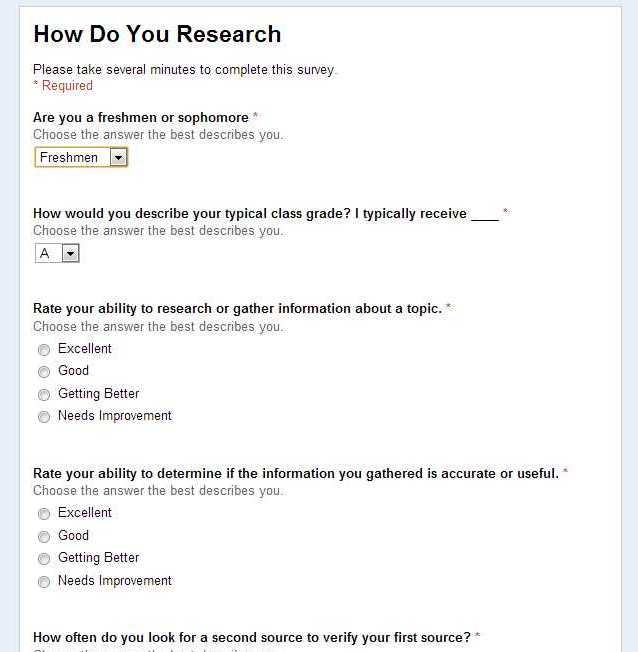
To get started I had the students complete the survey "How Do You Research". Although the survey data speaks volumes it was a student's question about the survey that got me excited, "Do we answer this as we researched before coming to KIH or how we research now?" 
The data suggest that many students are beginning to use Twitter but it also indicates that there is a large area of growth to using Twitter in a way that will create conversations between the student and an expert (and the content).

To encourage 2-way research I used our  Thursday "Tweet Start" to have students find and follow an expert. They did this by searching their topic (with a # in front of it). Students then looked for interesting Tweets, next they checked to see who and how many were following the individual. If it was promising they followed the "expert". 

Students will continue to build their "expert list" as the project moves forward. Using DM (direct message) will be our next step, this will allow students to converse with the expert. Until then they can tweet @<expert>.

By connecting with an expert or experts students will increase their opportunities to ask question and confirm their beliefs or correct their misunderstandings.

Saturday, November 17, 2012

Part A - Brainstorming Web Conferencing

Several years ago I participated in my first Skype conversation, it was with my brother in-law and his family who, at that time, lived in France. My memories of it are awkward and painful, I was not use to this typpe of conversation. We had several more Skype conversations over the next couple years, each of which were a little better then the previous, but still not great.
Things changed when we purchased my son an Ipod and he began to Facetime his friends and us. I thought if he can do this the I can as well. So I began to participate in web conferences whenever possible to become more comfortable with the medium. Then the craziest thing happened this year, I started to have students Skype into class when they were home sick or at their home school (it is a daily event now). This led me to try live streaming my class one week when I knew there would be a large number of kids missing do to transportation issues with their home school. We tried Google Hangout Live-stream and although it did not work that day it gave me chance to get familiar with it. So a week later when we had to have a MAET small team web conference I suggested using Google Hangout (not the Livestream but the regular version). My partners were happy to give it a try, as it was new to them too.
I found it easy to use and it had many features including screen share, allowing us to enhance our conversation and share different websites with one another. With the exception of broadcasting myself eating a hamburger as I waited for my teammates to answer the invite (luckily I finished wiping the ketchup off my face just before they answered) the conference went very well.
We used Camtasia to record the conference and then uploaded the video to www.screencast.com to share with one another. The Live-stream function would have done the same but we struggled with getting that to work.
In the end , we decided to create a stand alone professional development using Educreation about how a teacher could use Educreation to enhance their own teaching. We look forward to sharing our final product with you in a few weeks.

Watch below to see how we used Google Hangout